
Knowing the many weaknesses of Windows File Explorer, anyone needing to search for files and folders or copy and move them without opening multiple windows will find Q-Dir to be an excellent free alternative to one of the oldest and least developed tools of Microsoft’s OS. This small yet comprehensive utility provides you with everything you always wanted File Explorer to be.
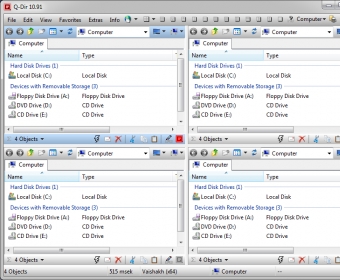
The program offers you an interface where you can arrange from 1 to 4 panels in various ways, so that you can display the contents of up to four different units all at once. Besides, each of those panels supports as many tabs as you need, so the number of folders, disks, and units you can work with at a given time are nearly endless. To make things even easier, you can apply different color codes to specific type files, as well as highlight certain files by name, extension, etc. Copying or moving files and folders from one panel to another can be done using the drag-and-drop technique, or the most conventional copy-and-paste procedure.
Useful as it is, its interface is not what made me keep this tool in my desktop forever since the first time I tried it a number of versions ago. It comes packed up with a series of utilities that make it indispensable in my day-to-day work, such as the possibility of checking the size of a file or a folder (including all its subfolders) just by looking at the size column, together with the number of subfolders and files they contain. Size can be displayed in bytes, KB, MB, or GB, and you can use the Windows way or the program’s own size measuring system. It is a pity that the program cannot order the folders by size as it does with individual files – I admit that’s a feature I’d love to see implemented in the near future.
Another tiny feature that I find really useful is the Export function. It allows you to list and save as a TXT, DOC, CSV, HTML, or XLS file the contents of any disk, folder, unit, etc., in a snap, including the size of each of the elements. If only it could list not only what you can see on the screen but also the files inside each folder and subfolder, this feature would be just perfect.
The viewing, organizing, displaying, and highlighting options of this incredible tiny free tool are endless. I can’t but recommend you to download and install it on your PC or laptop and start browsing its many possibilities – it’ll make you wonder how could you put up with the unnerving limitations of File Explorer for so long.






Comments (4)